
Introduction: Why Website Migration Needs a Structured Approach
Website migration is one of the most critical technical operations for any business. While it may look like a simple task—moving files from one server to another—the reality is far more complex. A poorly executed migration can result in:
- Website downtime
- Loss of search engine rankings
- Broken links and missing pages
- Email failures
- Security vulnerabilities
- Permanent data loss
On the other hand, a well-planned website migration can improve performance, scalability, security, and long-term maintainability.
This complete step-by-step guide is designed to help business owners, developers, and IT teams migrate websites safely, without downtime, and without harming SEO.
What Is Website Migration?
Website migration refers to any significant change made to a website that can affect how users or search engines access it.
Common Types of Website Migration
- Hosting migration (shared → VPS / cloud)
- Server migration (old server → new server)
- Domain migration (example.com → example.in)
- CMS migration (HTML → WordPress)
- Platform migration (WordPress → Headless CMS)
- Infrastructure migration (cPanel → cloud stack)
- HTTPS migration (HTTP → HTTPS)
Each type carries different risks, but the core migration principles remain the same.
Why Businesses Migrate Websites
Businesses typically migrate websites due to:
- Poor server performance
- Frequent downtime
- High hosting costs
- Security issues
- Scalability limitations
- Change in technology stack
- Business expansion
- SEO or performance optimization
A migration should always be strategic, not reactive.
Website Migration Risks (If Done Incorrectly)
Before starting, it’s important to understand what can go wrong:
- ❌ Google ranking drop
- ❌ Website inaccessible during peak hours
- ❌ Corrupted database
- ❌ Missing images or files
- ❌ Email delivery failures
- ❌ SSL certificate errors
These risks can be completely avoided with the right process.
Website Migration Checklist (High-Level Overview)
Before diving into details, here’s the bird’s-eye view:
✔ Define migration goal
✔ Choose migration type
✔ Take full backup
✔ Prepare new environment
✔ Migrate files & database
✔ Test website thoroughly
✔ Update DNS
✔ Monitor performance & SEO
Each step is explained in detail below.
Step 1: Define Your Website Migration Goal
Every migration must start with clarity.
Ask these questions:
- Why are we migrating?
- What problem are we solving?
- Are we changing hosting, domain, or platform?
- Is SEO preservation critical?
- Is downtime acceptable?
Examples:
- Performance-driven migration: Shared → VPS
- SEO-driven migration: HTTP → HTTPS
- Business-driven migration: Old vendor → new IT partner
Your answers determine tools, timeline, and risk level.
Step 2: Audit the Existing Website
Before touching anything, audit your current website.
Technical Audit
- Total file size
- Database size
- PHP version
- CMS version
- Plugins/modules
- Cron jobs
- Custom scripts
SEO Audit
- Total indexed pages
- Top-ranking URLs
- Backlinks
- Meta data
- Sitemap
- Robots.txt
Email & DNS Audit
- MX records
- SPF, DKIM, DMARC
- Subdomains
- CDN setup
This audit becomes your migration reference document.
Step 3: Take a Complete Website Backup (Non-Negotiable)
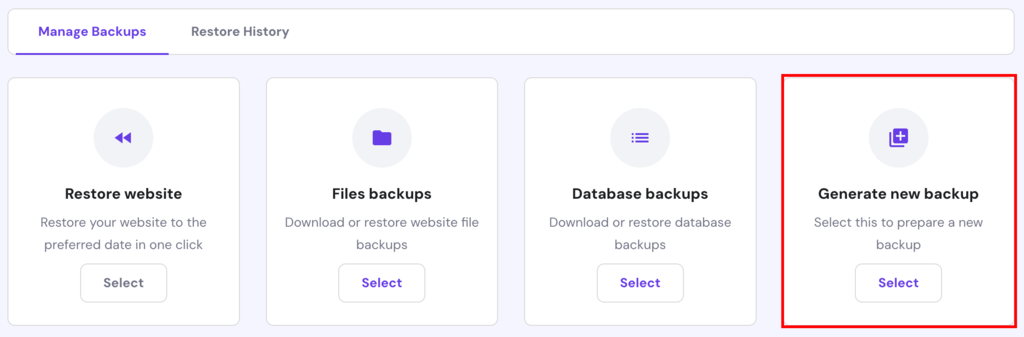
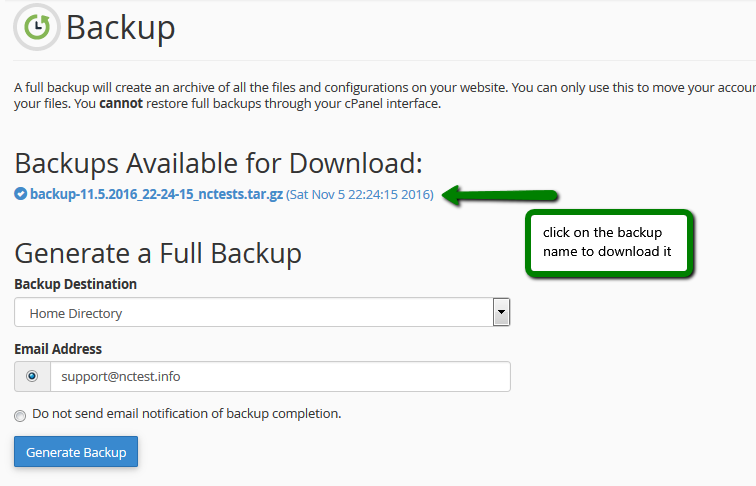
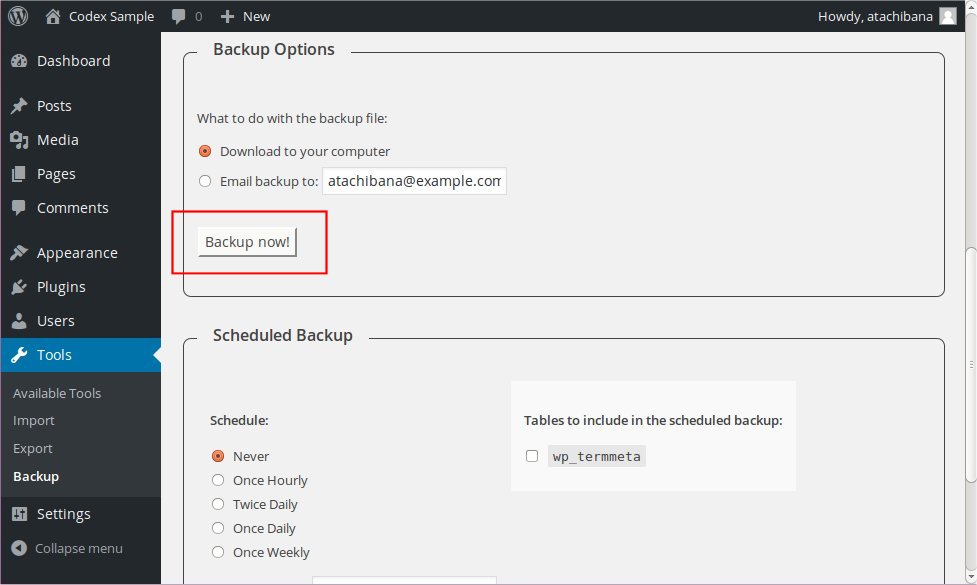
You should always take multiple backups.
What to Backup
- Website files
- Database(s)
- Emails (if hosted on same server)
- DNS zone file
- SSL certificates (if possible)
Backup Methods
- cPanel full backup
- Manual (FTP + phpMyAdmin)
- WordPress backup plugins
- Server snapshot (cloud servers)
👉 Rule: Never start migration without verifying backup integrity.
Step 4: Prepare the New Hosting / Server Environment
Your new environment should be ready before migration.
Server Configuration Checklist
- OS & server type (Apache / Nginx)
- PHP version & extensions
- MySQL / MariaDB version
- Disk space
- RAM & CPU
- Firewall rules
- SSH access
- File permissions
CMS Preparation
- Install WordPress / CMS (if required)
- Create empty database
- Set correct PHP limits
- Configure temporary URL or hosts file
Step 5: Migrate Website Files
File Migration Methods
- FTP / SFTP
- SCP / Rsync (recommended for large sites)
- cPanel → cPanel transfer
- Plugin-based migration (WordPress)
Best Practices
- Maintain directory structure
- Verify file permissions
- Ensure hidden files (.htaccess) are copied
- Compare file sizes after transfer
Step 6: Migrate the Database Safely
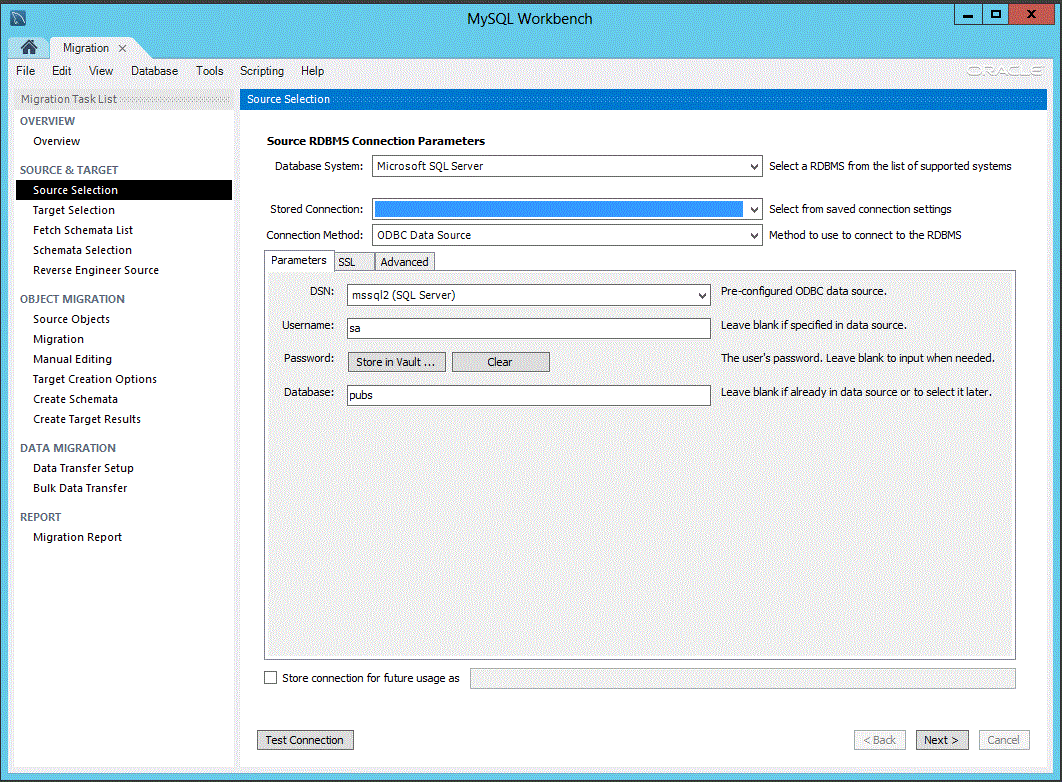
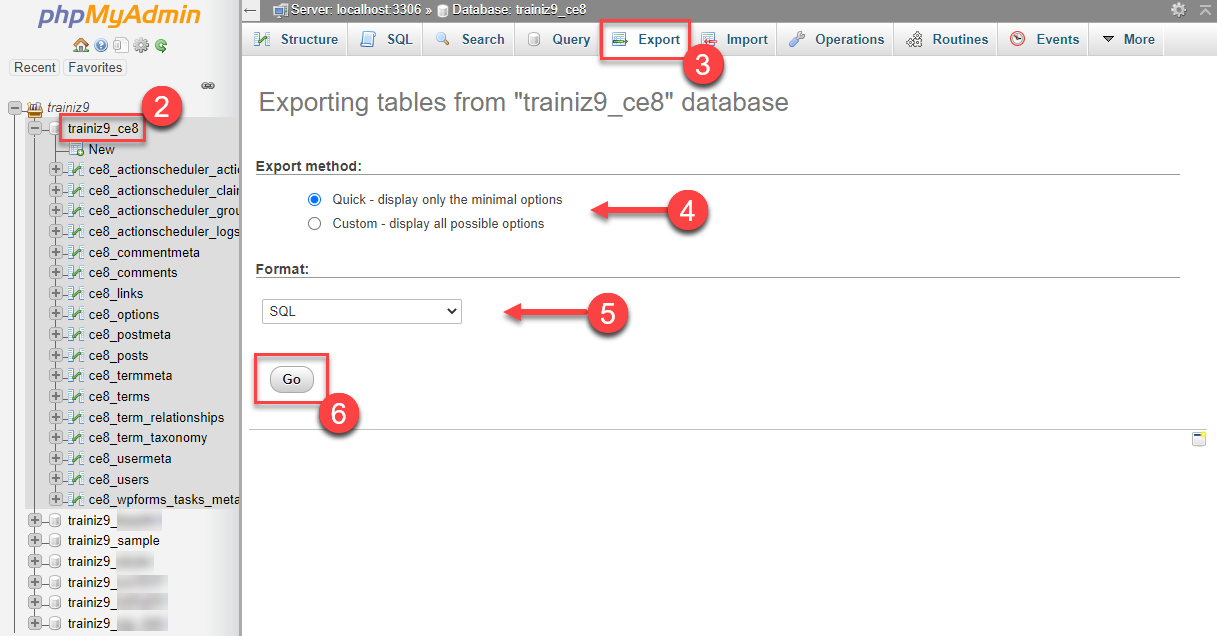
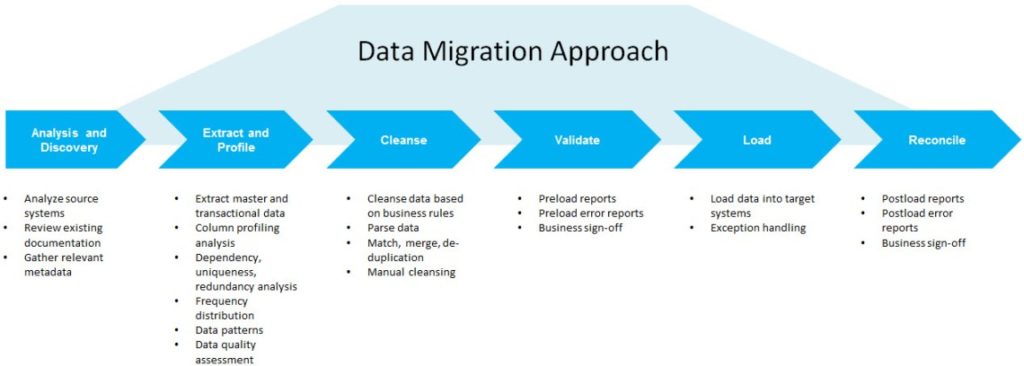
Database migration is often where things break.
Database Migration Steps
- Export database from old server
- Create database on new server
- Import database
- Update configuration files
- wp-config.php
- env files
- Check table prefix
- Test database connection
Common Errors
- Connection refused
- Incorrect credentials
- Charset mismatch
- Large import timeout
Step 7: Update Configuration Files
Most websites rely on configuration files.
Files to Check
- wp-config.php
- .env
- config.php
- .htaccess
- custom config files
Update:
- Database credentials
- Absolute paths
- Domain references (if changed)
Step 8: Test Website on New Server (Before DNS Change)
Never point DNS before testing.
Testing Methods
- Temporary URL
- Hosts file modification
- IP-based access
What to Test
✔ Homepage
✔ Internal pages
✔ Forms
✔ Login / Admin panel
✔ Images & media
✔ Search functionality
✔ Payment gateways (sandbox)
Fix all issues before going live.
Step 9: SEO Preparation Before Going Live
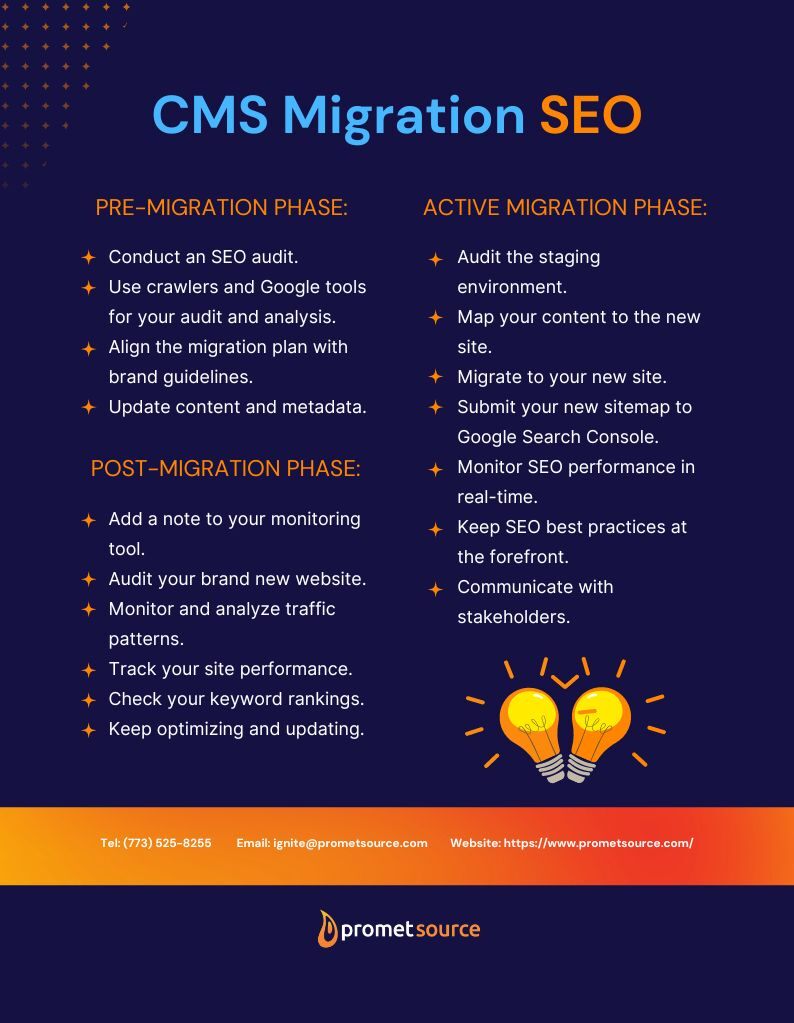


If SEO matters, this step is critical.
SEO Checklist
- URL structure unchanged
- Meta tags preserved
- Canonical tags verified
- Sitemap ready
- Robots.txt checked
- Noindex removed
- Analytics installed
If domain or URLs change, prepare 301 redirect mapping in advance.
Step 10: DNS Change & Go-Live Strategy
DNS Best Practices
- Reduce TTL 24 hours before switch
- Change DNS during low-traffic hours
- Update nameservers or A record carefully
Zero-Downtime Technique
- Keep old server active
- Sync database just before switch
- Switch DNS
- Monitor traffic
- Decommission old server only after confirmation
Step 11: Post-Migration Testing (Critical)
Once DNS propagates:
Functional Checks
✔ Website loads globally
✔ Forms submit correctly
✔ Emails deliver properly
✔ SSL works without warnings
SEO Checks
✔ Google Search Console access
✔ Sitemap submission
✔ Index coverage
✔ Crawl errors
Performance Checks
✔ Page speed
✔ Server response time
✔ Error logs
Step 12: Monitor for 7–14 Days After Migration
Migration doesn’t end on launch day.
What to Monitor
- Uptime
- Google rankings
- Traffic patterns
- Error logs
- Security alerts
Early detection prevents long-term damage.
Common Website Migration Mistakes (And How to Avoid Them)
❌ Skipping backups
❌ Migrating without testing
❌ Ignoring SEO
❌ DNS changes without TTL planning
❌ Shutting down old server too early
Professional migrations are boring—because nothing breaks.
When Should You Hire Website Migration Experts?
You should consider experts if:
- Website is business-critical
- Traffic or SEO revenue is high
- Custom code or integrations exist
- Emails are hosted on same server
- Zero downtime is mandatory
How DEVEXIS INDIA Handles Website Migration
At DEVEXIS INDIA, we follow a structured, risk-free migration framework:
- Pre-migration audit
- Full backup & rollback plan
- Staging environment testing
- SEO-safe execution
- Zero-downtime DNS strategy
- Post-migration monitoring
Our approach ensures business continuity and performance improvement, not just data movement.
Final Website Migration Checklist (Quick Reference)
✔ Goal defined
✔ Backup verified
✔ New server ready
✔ Files migrated
✔ Database connected
✔ Config files updated
✔ SEO protected
✔ DNS switched safely
✔ Monitoring active
Conclusion
Website migration is not just a technical task—it is a business-critical operation. With the right planning, tools, and execution, migration can be smooth, safe, and beneficial.
This guide gives you a complete, practical roadmap to migrate websites without fear, downtime, or SEO loss.
📞 Need Help with Website Migration?
Let DEVEXIS INDIA handle your migration professionally—securely, smoothly, and strategically.