
Introduction: Why Domain Transfer Needs a Proper Guide
A domain name is more than just a website address—it is a digital asset tied to your brand identity, emails, SEO rankings, and business credibility. Transferring a domain incorrectly can lead to website downtime, email failure, SEO loss, or even permanent domain lockout.
Despite this, many business owners attempt domain transfers without understanding the process, often relying on half-baked tutorials or registrar support tickets. This comprehensive tutorial is designed to remove confusion and provide a safe, step-by-step, beginner-friendly guide to domain transfer—without downtime or risk.
Whether you are moving to a better registrar, consolidating domains, or migrating infrastructure, this guide covers everything you need to know.
What Is Domain Transfer?
Domain transfer is the process of moving your domain name from one domain registrar to another. For example, transferring a domain from GoDaddy to Namecheap, Google Domains, or any other ICANN-accredited registrar.
What Domain Transfer Does NOT Mean
- It does not automatically move your website files
- It does not migrate hosting or emails
- It does not change your domain ownership
Only the registrar management changes—unless you intentionally modify DNS or hosting later.
Common Reasons for Domain Transfer
Businesses and individuals typically transfer domains due to:
- High renewal costs at the current registrar
- Poor customer support
- Better DNS management features elsewhere
- Consolidating multiple domains under one account
- Moving away from restrictive registrars
- Improved security or compliance needs
Understanding why you are transferring helps determine how to do it safely.
When You Cannot Transfer a Domain (Important)
Before proceeding, ensure your domain is eligible. Domain transfer is not allowed if:
- The domain was registered or transferred in the last 60 days
- The domain is expired (some grace exceptions apply)
- Domain is locked and cannot be unlocked
- WHOIS email is inaccessible
- Legal dispute or registry hold exists
Ignoring these rules results in failed transfers and delays.
Pre-Transfer Checklist (Must Do Before Starting)
Before initiating the transfer, complete this checklist carefully.
1. Verify Domain Age
Your domain must be older than 60 days since registration or last transfer.
2. Ensure Access to WHOIS Email
Transfer approval emails will be sent to the registrant email address.
3. Take Website & Email Backup
Even though domain transfer does not move data, DNS misconfiguration can cause downtime.
4. Check Domain Expiry Date
It’s best to transfer when at least 7–15 days validity remains.
Step-by-Step Domain Transfer Process
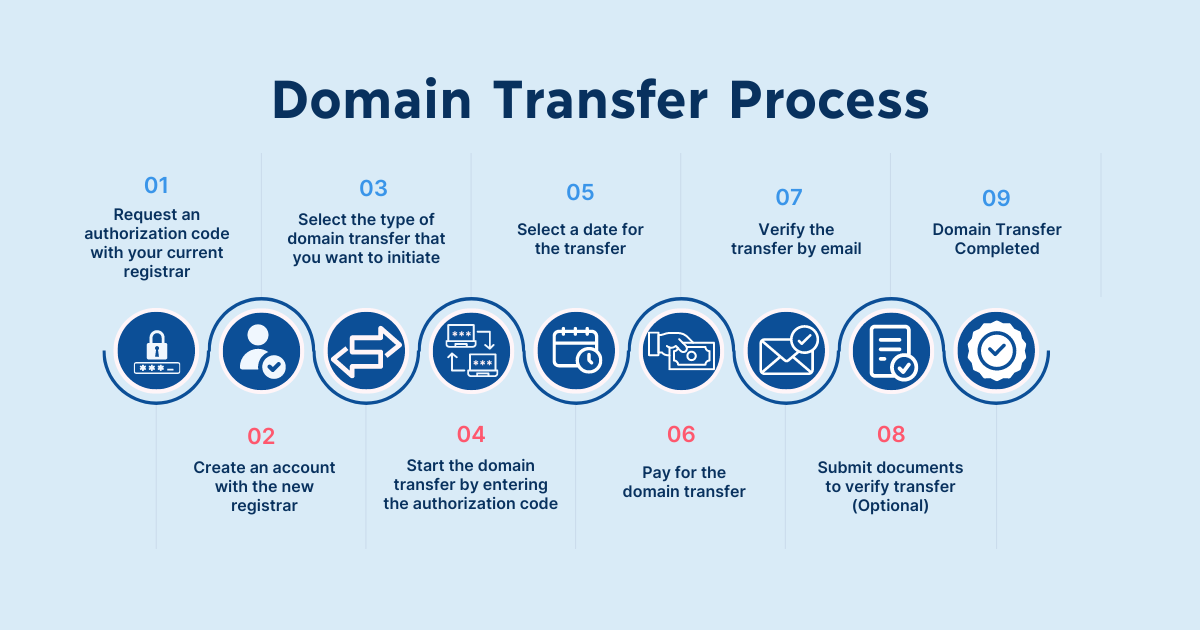
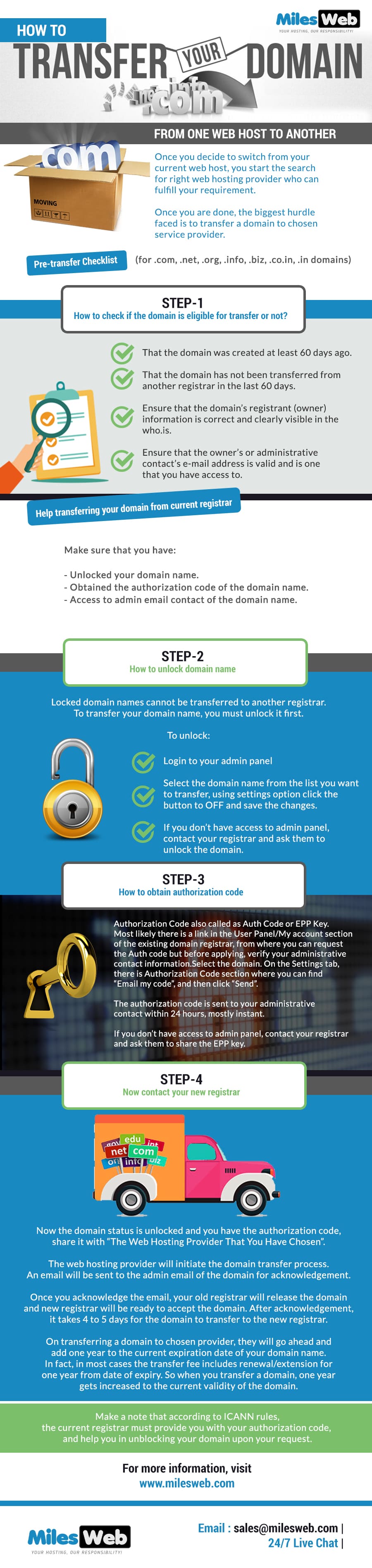

Step 1: Unlock the Domain
Most registrars lock domains by default to prevent unauthorized transfers.
- Login to your current registrar
- Navigate to Domain Settings
- Disable Domain Lock / Transfer Lock
- Save changes
This step is mandatory. Without unlocking, transfer will fail.
Step 2: Disable WHOIS Privacy
WHOIS privacy hides your email address. Since transfer approval emails must reach you:
- Turn OFF WHOIS Privacy temporarily
- Verify that your email appears correctly
You can re-enable privacy after transfer completion.
Step 3: Obtain the EPP / Authorization Code
The EPP (Extensible Provisioning Protocol) code, also called Auth Code, is a unique transfer password.
- Generate EPP code from registrar dashboard
- Or request it via support (some registrars email it)
- Keep it secure and confidential
Step 4: Initiate Transfer at New Registrar
Now move to the new registrar:
- Select “Transfer Domain”
- Enter your domain name
- Paste the EPP/Auth code
- Make payment (usually includes 1-year renewal)
- Submit transfer request
Step 5: Approve Transfer via Email
Within minutes to hours, you’ll receive a transfer approval email.
- Click the approval link
- Confirm transfer request
If not approved, the transfer will remain pending.
Step 6: Wait for Transfer Completion
Typical transfer duration:
- 5–7 days (can be faster if manually approved)
Some registrars allow instant approval to speed up the process.
What Happens After Domain Transfer?
Once completed:
- Domain management moves to new registrar
- Domain validity extends by 1 year
- DNS settings may reset (depends on registrar)
- WHOIS privacy can be re-enabled
👉 Important: Always verify DNS records immediately after transfer.
DNS Management After Transfer (Critical Step)
To avoid website or email downtime:
- Verify nameservers
- Check A record (website IP)
- Verify MX records (email delivery)
- Confirm SPF, DKIM, DMARC (for business emails)
Incorrect DNS is the #1 cause of post-transfer downtime.
Does Domain Transfer Affect SEO?
Short answer: No—if done correctly.
Safe for SEO When:
- Nameservers remain unchanged
- No downtime occurs
- URLs remain the same
Risky When:
- DNS propagation causes downtime
- Website becomes temporarily inaccessible
- Email failures cause business disruption
Search engines do not penalize registrar changes.
Common Domain Transfer Errors & Fixes
❌ Transfer Stuck or Pending
✔ Ensure email approval is completed
✔ Unlock domain again and retry
❌ Auth Code Invalid
✔ Regenerate fresh
✔ Remove spaces when copying
❌ Website Down After Transfer
✔ Restore correct DNS records
✔ Reduce TTL before switching
Security Best Practices During Domain Transfer
- Never share EPP code publicly
- Avoid public Wi-Fi during transfer
- Enable 2FA at new registrar
- Lock domain immediately after transfer
- Re-enable WHOIS privacy
Domains are prime targets for hijacking.
Final Domain Transfer Checklist
✔ Domain unlocked
✔ WHOIS privacy disabled
✔ Auth code obtained
✔ Transfer initiated correctly
✔ Email approval completed
✔ DNS verified post-transfer
✔ Domain re-locked
When Should You Hire Experts?
You should consider professional help if:
- You manage business-critical domains
- Multiple domains are involved
- Custom DNS/email setups exist
- Zero downtime is mandatory
- You lack registrar experience
How DEVEXIS INDIA Handles Domain Transfers
At DEVEXIS INDIA, we follow a zero-downtime, security-first approach:
- Pre-transfer audit
- DNS snapshot & rollback plan
- Controlled transfer window
- Post-transfer verification
- SEO & email continuity assurance
This ensures business continuity without surprises.
Conclusion
Domain transfer is not complex—but it demands precision. When executed correctly, it is completely safe, SEO-friendly, and beneficial. When done casually, it can disrupt business operations.
This guide equips you with everything needed to transfer domains confidently and securely.
📞 Need Help With Domain Transfer?
Get expert assistance from DEVEXIS INDIA and ensure a smooth, risk-free transition.